json11 in nx_kit does not seem to parse json string properly
Answered
I add the following snippet to device_agent.cpp to simulate retrieving polygon coordinates (aka. points):
std::string pf_err;
std::string test = R"({"figure":{"color":"#e040fb","points":[[0.795,0.7058823529411765],[0.785,0.9558823529411765],[0.9483333333333334,0.961764705882353],[0.97,0.7294117647058823]]},"label":"aaa","showOnCamera":true})";
printf(">>>> test: %s\n", test.c_str());
Json js_polygon = Json::parse(test, pf_err);
std::cout << ">>>> js_polygon = " << js_polygon.dump() << "\n";
the parsed result is not identical to the content of "test", this is what I got:
>>>> js_polygon = {"figure": {"color": "#e040fb", "points": [[null, null], [null, null], [null, null], [null, null]]}, "label": "aaa", "showOnCamera": true}
those numbers of coordinates (aka. points) become "null" after the json string is parsed.
Please correct me if I am not using json11 in the right way.
-
When I change points to string array, Json::parse() is able to parse properly.
std::string pf_err;
std::string test = R"({"figure":{"color":"#e040fb","points":[["0.795","0.7058823529411765"],["0.785","0.9558823529411765"],["0.9483333333333334","0.961764705882353"],["0.97","0.7294117647058823"]]},"label":"aaa","showOnCamera":true})";
printf(">>>> test: %s\n", test.c_str());
Json js_polygon = Json::parse(test, pf_err);
std::cout << ">>>> js_polygon = " << js_polygon.dump() << "\n";
and the output becomes
>>>> js_polygon = {"figure": {"color": "#e040fb", "points": [["0.795", "0.7058823529411765"], ["0.785", "0.9558823529411765"], ["0.9483333333333334", "0.961764705882353"], ["0.97", "0.7294117647058823"]]}, "label": "aaa", "showOnCamera": true}However, the polygon setting retrieved by "settingValue()" has points as double array.
How do I configure json11 to make it parse double array properly?
0 -
after updating strtod_dot() in json11.cpp, I am able to get those double values
double strtod_dot(const char* str) {
const size_t str_length = strspn(str, "0123456789.eE+-");

char str_double[str_length+1] = {0};
strncpy(str_double, str, str_length);
double f = atof(str_double);
return f;
}
0 -

Hello James,
I took the sample_analytics_plugin of the Metadata SDK.
I refactored your code a little and put it into the DeviceAgent::pushUncompressedVideoFrame() method.
You can use any other method of your choice.Include the <nx/kit/json.h> header file.
Here is the code
    std::string pf_err;
    std::string test = R"({
        "figure":{
            "color":"#e040fb",
            "points":[
                [0.795,0.7058823529411765],
                [0.785,0.9558823529411765],
                [0.9483333333333334,0.961764705882353],
                [0.97,0.7294117647058823]
            ]
        },
        "label":"aaa",
        "showOnCamera":true})";
    NX_PRINT << ">>>> test: " << test;
    nx::kit::Json js_polygon = nx::kit::Json::parse(test, pf_err);
    NX_PRINT << ">>>> js_polygon = " << js_polygon.dump();
And here is the output. The code seems working correctly.
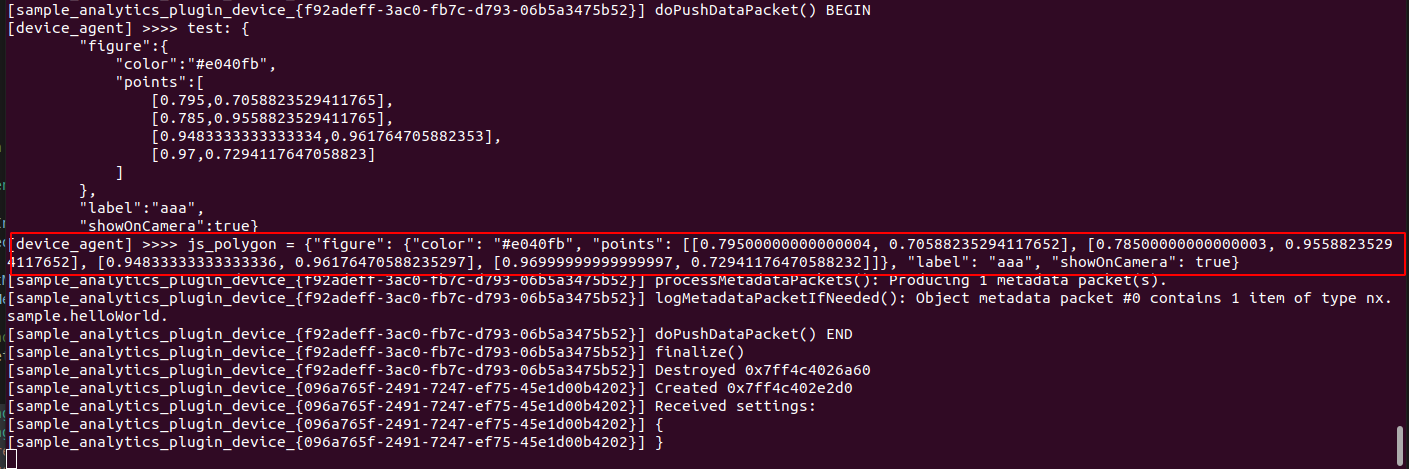 0
0 -
Hi Andrey,
I am experiencing something very strange. I tried to create a Json object with a double value, but the created Json object does not have the value. When I do the same thing with an integer, the created Json has the value. What happens?
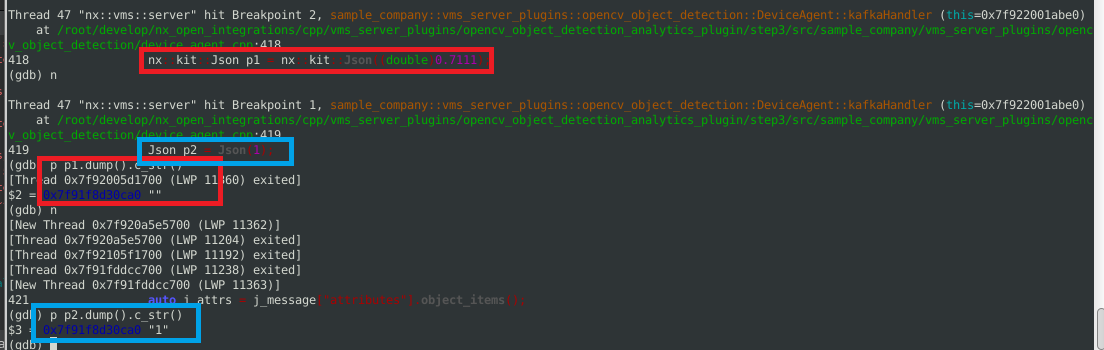 0
0 -
Hello James,
Here is what I did to test that.
1. I took Nx Meta and Metadata SDK 5.0.0.34326
2. Refactored sample_analytics_plugin
bool DeviceAgent::pullMetadataPackets(std::vector<IMetadataPacket*>* metadataPackets)
{
    nx::kit::Json jsonDouble =  nx::kit::Json((double) 0.71111);
    NX_PRINT << "DEBUG " << jsonDouble.dump();
    metadataPackets->push_back(generateObjectMetadataPacket().releasePtr());

    return true; //< There were no errors while filling metadataPackets.
}
3. Rebuilt the plugin.
4. Copied the plugin to the "plugins" folder
5. Configured Server output redirection
sudo touch /home/networkoptix-metavms/.config/nx_ini/mediaserver_stderr.log
6. Restarted the Server.
7. Logged in via GUI and enabled Sample plugin on a camera.
8. Monitored the /home/networkoptix-metavms/.config/nx_ini/mediaserver_stderr.log file
sudo tail -f /home/networkoptix-metavms/.config/nx_ini/mediaserver_stderr.log | grep DEBUG
Here is the result
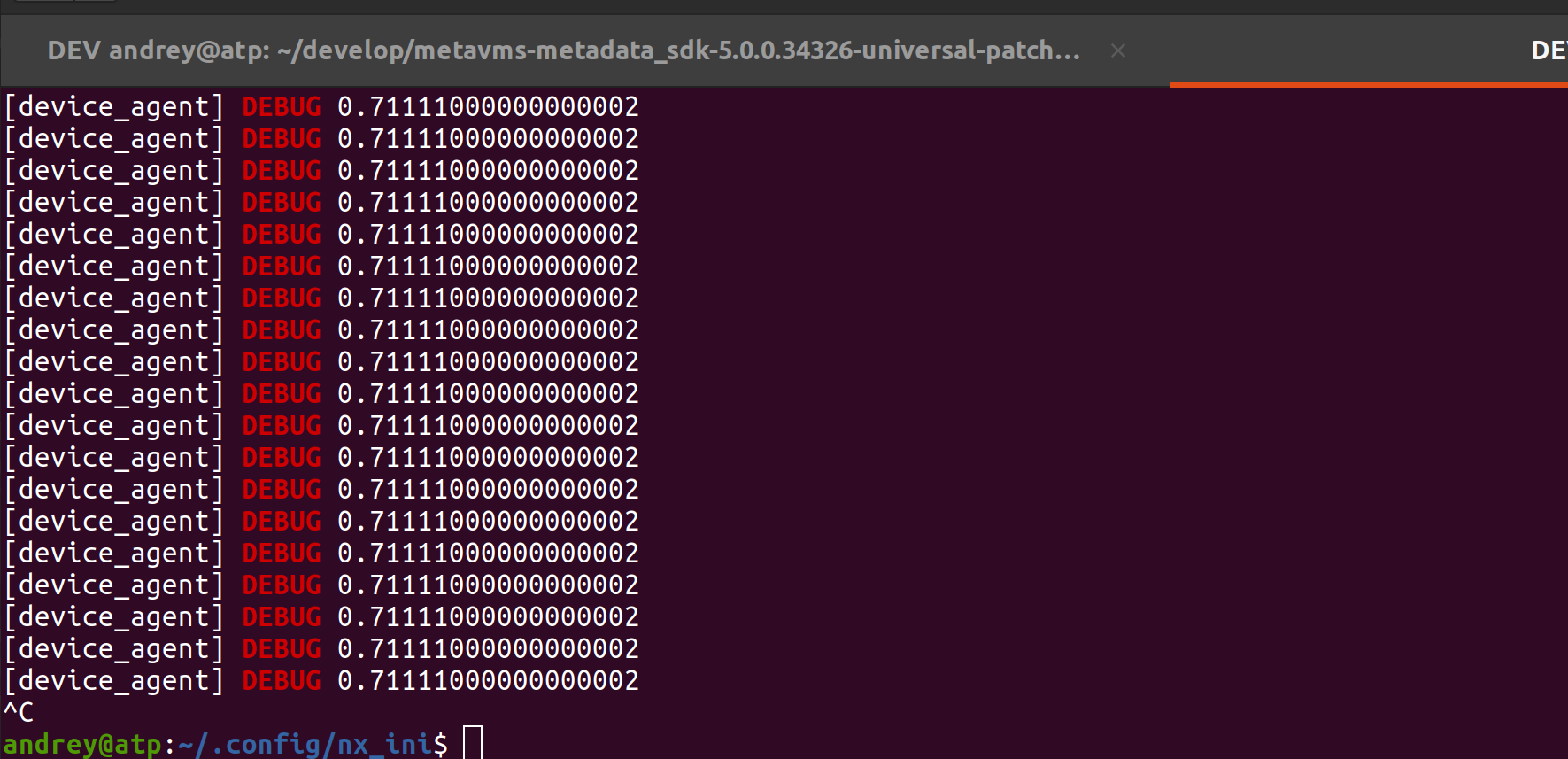
Seems everything works fine.
0
Please sign in to leave a comment.
Comments
5 comments