Object Actions
Completed
I am currently using Object Action to do face id searching
The requirement are:
- Right click an object in Advanced Object Search
- Select “find similar”
- The plugin compare the attribute “face feature” with other objects to find what object have similar feature, then show those objects on the Advanced Object Search result
Questions:
- Does NX support pulling object records from database to plugin ?
- Is there any method that a plugin can use to tell the vms server to serve specific required data, or to show or turn on something on the vms client ?
-

Hi Phạm Quang Đăng ,
- Does NX support pulling object records from database to plugin ?
No, there is no direct method to do search queries directly from the plugin.
That said, the SDK allows sending the authorized API calls to the Media Server from within the plugin.
See the implementation in Stub plugin of this interface:
IUtilityProvider::sendHttpRequest(
HttpDomainName requestDomainName,
const char* path,
const char* httpMethod,
const char* mimeType,
const char* requestBody,
Ptr callback)
Using it you could send the API call to retrieve the following information:
- Object tracks(https://meta.nxvms.com/doc/developers/api-tool/rest-v4-analytics-objecttracks-get) for the camera that match certain filter
- Best shots for those object tracks(https://meta.nxvms.com/doc/developers/api-tool/rest-v4-analytics-objecttracks-id-bestshotimage-get)
Is there any method that a plugin can use to tell the vms server to serve specific required data, or to show or turn on something on the vms client ?
I hope the above information helps, but what exactly do you mean by “or to show or turn on something on the vms client ”?
0 -
Oh, sorry for taking so long to reply.
Yes i used sendHttpRequest with the Get Object Tracks /rest/v4/analytics/objectTracks to find specific object Tracks. After getting the returned object tracks i want to show them on the Advanced Object Search window.
This image can help demonstrating the goal: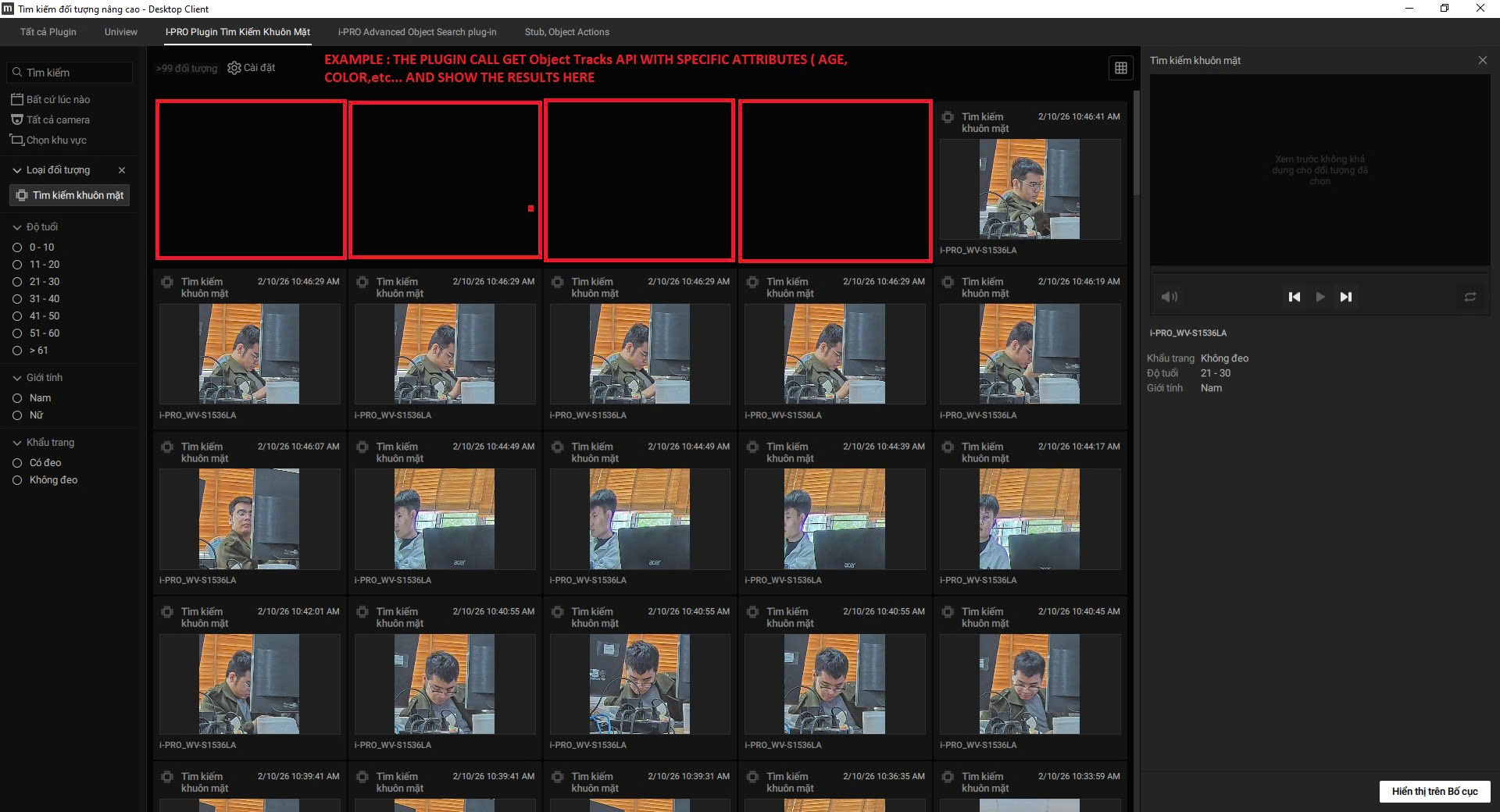 0
0 -
For better understanding, the red square boxes represent the object tracks that has been returned to the plugin and being displayed for the user to see, interact, etc…
0 -
Hello, do you have an answer yet ?
0 -
Hello Phạm Quang Đăng ,
Sorry, we don't quite understand what is that you wish to accomplish with that.
Would you like for certain objects to be listed in the Advanced Search dialog eventually?
Or would you like to “manage/control" client behavior thru the plugin code so that when user opens up this dialog, the plugin would “force show" the specific object tracks?I am asking because this dialog is utilizing the very same API requests. And depending on the filters and selected object search options at the left part, the response will be different.
There is no way to manage this outside the user window.
0
Please sign in to leave a comment.
Comments
5 comments