NetworkOptix stdout/stderr in Windows
Answered
I want to see stdout/stderr in Windows.
I tried everything from this topic and more https://support.networkoptix.com/hc/en-us/community/posts/360043327433-How-to-debug-plugin-code-?page=1
I tried to launch mediaserver.exe with different args (I killed all nx-related processes on the host before that) and nothing happened (process started and worked but it showed nothing in the terminal)
I tried to create 'nx_ini' folder with those empty files everywhere:
C:\
C:\users\<my_user>\
C:\users\<my_user>\AppData\Local
C:\users\<my_user>\AppData\Local\.config
C:\users\<my_user>\AppData\Local\<Nx Vendor>\<Nx product>\nx_ini
C:\Program Files\<Nx Vendor>\<Nx product>\Mediaserver\nx_ini
etc.
None of the above worked.
How can I redirect NX output to the file in Windows?
Or how can I see it in the terminal? I see '--help' output in linux but process shows nothing in Windows and it doesn't matter which args I pass to it.
-
Official comment

Hendrik,
I'm sorry for fractioned answers. We are going to publish the debugging guide soon, with consistent description.
Meanwhile, here are the conditions.
Please be noted, currently, the OutputRedirector mechanism doesn’t work on Windows (stdout and stderr are lost) when a Plugin is built using the Debug build configuration.
1. Enable output redirection for the Server.
I.e. redirect output to _stderr.log file, as described above.2. Enable plugin output.
Touch a file in the nx_ini dir with the name of the patterns <plugin name>.ini. For example,C:\Windows\system32\config\systemprofile\AppData\Local\nx_ini\> dir /b
mediaserver-bin_stderr.log
mediaserver-bin_stdout.log
stub_analytics_plugin.ini
Restart the server. The file will be populated with the values.
SetenableOutput=true
3. Messages from NX_PRINT, NX_OUTPUT appear in the *_stderr.log file.
Note, the file is rewritten every time the Server is restarted.Use grep or find (in Windows) commands for searching the file for messages.
It's a good practice of debugging to put some special symbols in every NX_PRINT clause. For example,
NX_PRINT << "ZZZZ debugging:" << "your message here";
Afterwards, you can easily find your message by grep -i ZZZZ or find /i "ZZZZ".
Here is more detailed quotation from the guide.
Logging via nx_kit
The idea of logging via nx_kit is simple – there are a couple of macros in nx/kit/debug.h that mainly just print the message to stderr. These macros can be considered to form two log levels: a regular one, and a verbose one. They are:
- NX_PRINT – prints the message to stderr, unconditionally. Consider it a regular log level.
- NX_OUTPUT– prints the message only if the configuration allows. Consider it a verbose log level.
- Here, the meaning of configuration can be defined via defining the macro NX_DEBUG_ENABLE_OUTPUT before including nx/kit/debug.h (the value of this macro must be a boolean);or relying on its default definition being the expression ini().enableOutput — this is the integration with the other nx_kit mechanism, IniConfig, described in this guide.
Both macros differ from std::cerr by offering additional usability:
- The message is automatically finished with a newline without the need to specify the final \n.
- A prefix is added to the message, constructed as follows: if a macro NX_PRINT_PREFIX is defined before including nx/kit/debug.h, its value is used as a prefix; if not, the prefix is calculated from the file name of the file that includes nx/kit/debug.h.
The stderr is chosen as the default stream because the messages directed to stderr are not buffered and, when written from different threads simultaneously, are less likely to collide and intersect. However, this stream can be changed to something else — see the Doxygen documentation for nx/kit/debug.h.
Example
// my_module.cpp
#define NX_DEBUG_ENABLE_OUTPUT true
#include <nx/kit/debug.h>

void func()
{
    // Note no need for the final `\n`.

    NX_PRINT << "Printed unconditionally.";
    NX_OUTPUT << "Printed only if NX_DEBUG_ENABLE_OUTPUT is true.";
}
Output:
[my_module.cpp] Printed unconditionally.
[my_module.cpp] Printed only if NX_DEBUG_ENABLE_OUTPUT is true.
Switching log level via a .ini file
To easily switch the log level in runtime, we recommend using the IniConfig mechanism of nx_kit. All you need to do is to add a boolean flag, called enableOutput, to your .ini options:
// my_module_ini.h

#include <nx/kit/ini_config.h>

struct Ini: nx::kit::IniConfig
{
    Ini(): IniConfig("my_module.ini") { reload(); }
    NX_INI_FLAG(0, enableOutput, "Whether to produce verbose log on stderr.");
};

inline Ini& ini()
{
    static Ini ini;
    return ini;
}
// my_module.cpp
#include "my_module_ini.h"
#include <nx/kit/debug.h>
void func()
{
NX_OUTPUT << "Printed only if my_module.ini contains the line: enableOutput=1";
}> But I don't see any plugins output. I tried to use NX_PRINT, NX_OUTPUT, std::cout and std::cerr. I don't see any messages from the plugin.
In general, the plugin messages appear in the very beginning of the start up procedure.
Before restarting the Server, I usually use something liketail -F mediaserver_stderr.log | grep -i ZZZZ
in order not to lose the messages.
Make sure your plugin is loaded. Search for "PluginManager" messages in the Server's log file.
-
Hello Hendrik,
> I tried to launch mediaserver.exe with different args (I killed all nx-related processes on the host before that) and nothing happened (process started and worked but it showed nothing in the terminal)
It is a bug in Windows version that does not allow seeing server messages in the console.
In other words "mediaserver.exe -e" does not show any message in the console.> How can I redirect NX output to the file in Windows?
By using output redirector.
> C:\users\<my_user>\AppData\Local\<Nx Vendor>\<Nx product>\nx_ini
That's a wrong path.
You can get the correct path to the nx_ini directory by invoking /api/iniConfig API
If you start the Server from the console nx_ini dir should be created in the C:\users\<my_user>\AppData\Local\ folder. See a sreenshot.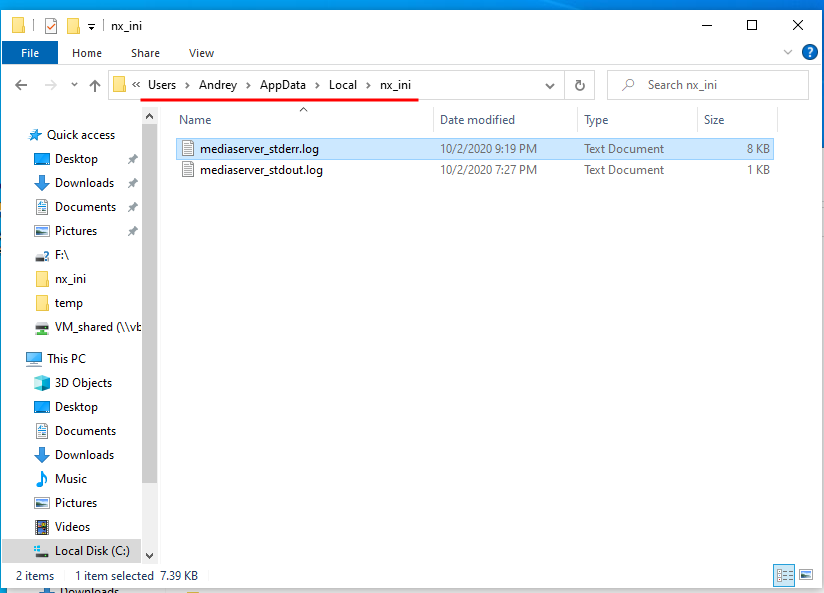
If you start the Server as a service the nx_ini dir should be crated in the %SYSTEMROOT%\system32\config\systemprofile\AppData\Local . See a screenshot.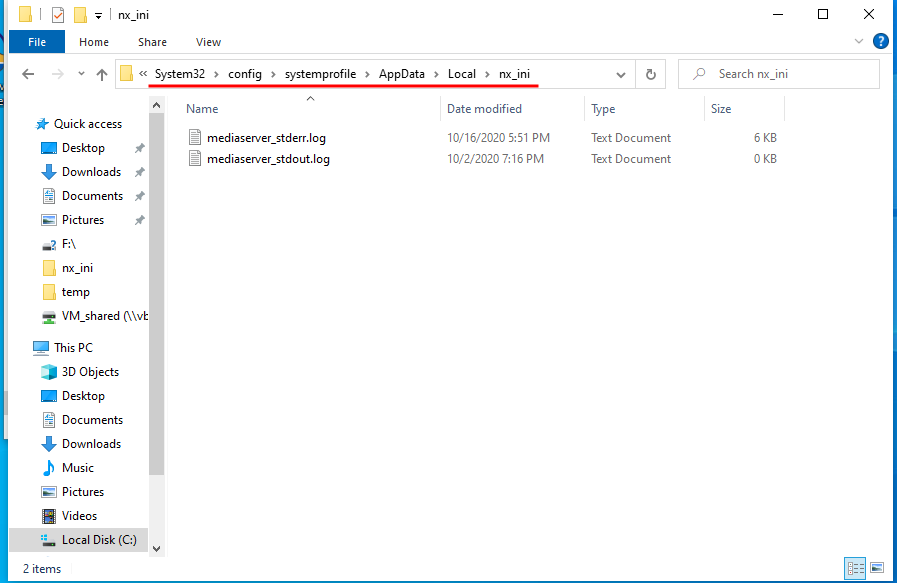 0
0 -
Hello Andrey,
Thanks for answer,
I invoked /api/iniConfig API and result is "C:\\Windows\\system32\\config\\systemprofile\\AppData\\Local\\nx_ini\\". I created this folder and created files inside of it and only then I got the output (files are not created automatically).
If someone else is stumbled upon this issue be careful with file names: it's mediaserver_stdout.log in Windows and mediaserver-bin_stout.log in Linux.0 -
But I have another issue.
For some reason there is no output in the stdout.log file. There is only a string
stdout of "mediaserver" is redirected to this file ("C:\\Windows\\system32\\config\\systemprofile\\AppData\\Local\\nx_ini\\mediaserver_stdout.log")
It's exactly as in your screenshot, Andrey: stdout size is 1Kb and there is only this string.
Meanwhile stderr works.0 -
Hi,
> It's exactly as in your screenshot, Andrey: stdout size is 1Kb and there is only this string.
Yes, it contains one string only, so far.All the output is sent to stderr since it's not buffered.
0 -
>All the output is sent to stderr since it's not buffered.
But I don't see any plugins output. I tried to use NX_PRINT, NX_OUTPUT, std::cout and std::cerr. I don't see any messages from the plugin.0 -
UPD: I spent too much time on such a simple thing.
I took plog and it works. https://github.com/SergiusTheBest/plog0 -
Hi
Please be noted, currently, the OutputRedirector mechanism doesn’t work on Windows (stdout and stderr are lost) when a Plugin is built using the Debug build configuration.
0
Please sign in to leave a comment.
Comments
8 comments