NxWitness - Client
Answered
Hi,
I see you add a new section in Export Video tab, "Info"
So now we can export with name of camera & export date.
But, we can't enable it as default.
So we need all time to enable "Info" for each export to get OSD in the export video.
Can you add in System Administration > System Settings : Use "Info" as default for export video
Best regards,
-

Hi, Jordan IUNCKER
Unfortunately, we don't plan to do this in system settings at this point.But settings are saved on a client side after one export. Also, those settings are cached in OS, e.g., in Windows, it's in the registry key ([HKEY_CURRENT_USER\SOFTWARE\Network Optix\Network Optix HD Witness Client], "exportMediaSettings"). You can change this when installing a client. But you'll need to run a script during installation or open a .reg file on a client machine.
There is an option for Linux and Mac, too -- just let me know if you need it.
Unfortunately, users will be able to change this, there is no way of making this strict/mandatory for the whole system. But if you save this setting by changing the registry key right after installation (using a script or by making one export with these settings), it is highly unlikely that users will change those settings, as for me.0 -
Hi Tagir Gadelshin,
Okey thanks !
Yes maybe, if you can do a script for windows to change this ?
Best regards,
0 -

Jordan – all export settings should be saved when you export a video.
So you will have to enable it only once on each machine.
0 -
Jordan IUNCKER Smth like
Reg Add "HKEY_CURRENT_USER\SOFTWARE\Network Optix\Network Optix HD Witness Client" /v "exportMediaSettings" /t "REG_SZ" /d "{\"applyFilters\":false,\"bookmarkOverlay\":{\"alignment\":\"AlignLeft^|AlignTop\",\"fontSize\":10,\"includeDescription\":true,\"indent\":4,\"offset\":{\"x\":0,\"y\":0},\"overlayWidth\":213},\"dimension\":480,\"fileFormat\":\"mkv\",\"imageOverlay\":{\"alignment\":\"AlignLeft^|AlignTop\",\"name\":\"\",\"offset\":{\"x\":0,\"y\":0},\"opacity\":1,\"overlayWidth\":114},\"infoOverlay\":{\"alignment\":\"AlignLeft^|AlignTop\",\"exportCameraName\":true,\"exportDate\":false,\"fontSize\":75,\"indent\":12,\"offset\":{\"x\":0,\"y\":0},\"overlayWidth\":320},\"rapidReview\":{\"enabled\":false,\"speed\":1},\"textOverlay\":{\"alignment\":\"AlignLeft^|AlignTop\",\"fontSize\":15,\"indent\":12,\"offset\":{\"x\":0,\"y\":0},\"overlayWidth\":320,\"text\":\"testtest\"},\"timestampOverlay\":{\"alignment\":\"AlignLeft^|AlignTop\",\"fontSize\":10,\"format\":\"DefaultLocaleLongDate\",\"offset\":{\"x\":0,\"y\":0}},\"usedOverlays\":[\"text\"]}"should do the trick (Win-only). You need to save as .cmd and start in on each client machine.
I copied the key, escaped quotes and pipe symbols, and added it in the command, that changes the registry key. Parameters are quite clear by their names -- you can experiment with font size and position.
But Aleksandr is right, my method is actually equivalent to just making one export with camera name enabled (there is even no need to finish export). All further exports will include camera name by default0 -
Hi @..., Hi Tagir Gadelshin
Alek : Yes right,
Tagir : Okey thanks for this script.
But, about what Alek say.. Yes all further exports will include camera name by default, but... you need to do it for each camera first... So at this moment I have around 200 device... I can't do this for each device...
And soon, many news customers merge to Nx, so Need to this again and again and again for each customers, each devices...
Is not possible to "enable info" & make 1 export for each device, for each customers....
I think need to enable "Infos" for each camera easily...
0 -
Oh no, you don't have to do it for all cameras. Export settings are universal and after you export any one camera they'll be set as defaults for exports for all cameras in the system.
0 -
Oh okey ! I test it tomorrow !!
Thanks you Alek0 -
Hi @... , Tagir Gadelshin
All my customer ask to add one things..
When you enable "Info" you can display "Camera Name" & "Export Date"
But in france we need "Camera Name" & "Event Date"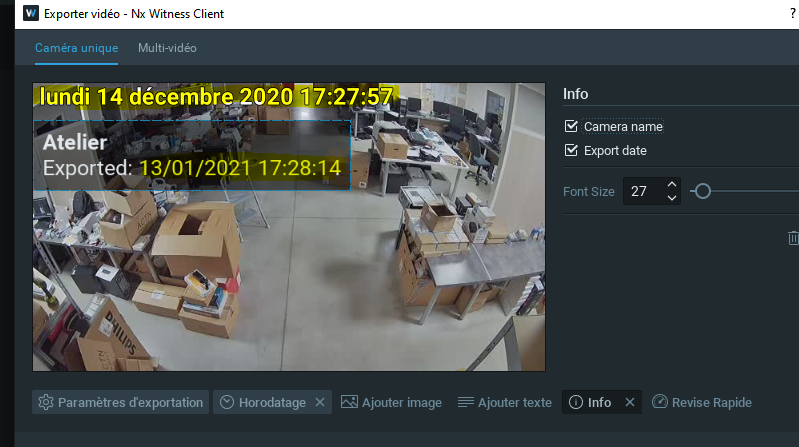
I know, my customer can enable "Timestamp" + "Info" ... But when you enable both.. you have lot of text display..
It's possible to add in "Info"
- Camera Name
- Export Date
- Event Date
So we can display only "Camera Name" & "Event Date" easily ?
It's really a needed features in France.
Best regards,0 -
Jordan,
Thank you for the feedback. We'll try to get it fixed.
--
FDBK-325
0 -
Jordan IUNCKER
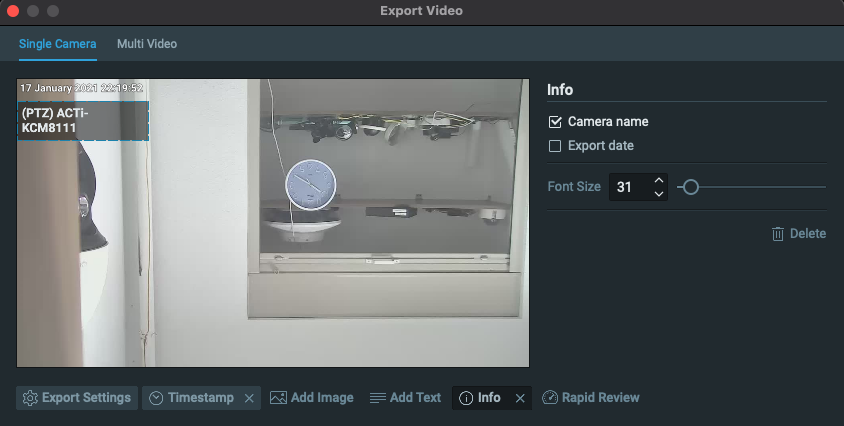
You can uncheck Export Date if don't need it
and also you can make timestamp and camera name smaller by adjusting the font size
Thanks0 -
 0
0 -
I know I can do it this way... but it's not a good solution for me and my clients...
Whenever they need to export some videos... So for each video they have to move and resize the timestamp and move and resize the camera name again...
Because sometimes the OSD of the name or timestamp hides a part of the scene, action, person or other... When my clients, who are mainly police officers, have to solve investigations, they have to do this each time as well
It's really not the best solution... just adding the timestamp in the "Info" options is the easiest for the user experience...
0 -
Jordan,
you and your clients don’t have to do it each time. All export settings are saved on the client side when you export a video. Export settings are universal and after you export any one camera they'll be set as defaults for exports for all cameras.But I understood that you struggle to click between tabs. We will see if we can improve this in future releases
0 -
Hi Tagir,
I know that, dont worries !
I Mean, when you need to export lot of video one by one, you need resize and move OSD "Infos" but now we need to resize timestamp too !
All video is not same aha.. maybe sometimes you need to move at top right.. maybe bottom left etc...I hope you understand what I mean...
0 -
Jordan IUNCKER
Now it's clear, thanks
The problem is not only in 2 different tabs but in the fact, that there are 2 different size controls, so you need to adjust both of them independently.
Got it, thanks, Jordan IUNCKER
I'll add it as feedback to improve it in the future. But to be honest, what we have now is a result of making it to you fast -- it was easier for us to not touch other controls and only add a new tab. So maybe in the future we will redesign how export works so frequently used controls are linked togetherFDBK-3280 -
Okey okey.. But I dont understand why you cant only add timestamp again in "infos" ? Or with other Name "Time of event" .. you have already Time of event.. so its easily for you to add this .. ?
0 -
Yes, thanks! I agree with you. As I said, it sounds like a good idea for future improvement
0 -
Fews months later, any news ?
0 -
Jordan IUNCKER no, unfortunately. We delivered several features in the latest releases regarding export and the team is concentrated on other parts of the software. I won't ex[etc this feature coming soon. But we created a feature request on our side.
0 -
Any news please ?
0 -
Jordan IUNCKER
No, sorry. We expect the whole export dialogue to be redesigned, but it is not planned for the next release as of now.0
Please sign in to leave a comment.
Comments
21 comments