Plug-In Integration
Answered
Dear Sir,
We have own graphical monitoring and management software that we have developed. We would like to integrate this software into your Nx Witness software. So we need to run our graphical user interface into your Nx Witness software. How can we run?
-

Hello Ekrem,
Could you please elaborate your objective? What does integration mean in your case? What function do you want your system to perform with Nx Wintess? Could you share your typical scenario with us?
> So we need to run our graphical user interface into your Nx Witness software
If your system has a web-interface you could create a web-page object. See a screenshot attached.
 0
0 -
Dear Sir,
Please find our last integration project with Pelco’s VideoXpert software. You can download related information from: http://www.mavilishare.com/mu3wpxMa
From integration, we want;
- to run as a plug-in within the Nx Witness framework software with our graphical user interface,
- to share events with Nx Witness framework,
- to start streaming live images from ip cameras defined in Nx Witness through our graphical monitoring and management software.
0 -
Hello Ekrem,
> to run as a plug-in within the Nx Witness framework software with our graphical user interface,
You could develop an analytics plugin with Metadata SDK. SDK provides possibilities for defining versatile settings visible in Nx Desktop Client. If those are not enough for your task, of course you could develop an external app with GUI which could communicate with your plugin over the network.
For plugin examples, see the "samples" folder of the SDK and this repo https://github.com/networkoptix/nx_open_integrations
> to share events with Nx Witness framework,
Your plugin could generate "Plugin diagnostics events" or "Plugin analytics events" thus notifying the Server and a user. These events can be configured for processing in the "Event rules..." dialog of the Desktop client.
It's up to the plugin to define the conditions when the plugin event should be triggered. For example, it might be a retrieval of a notification on the event in the external system.> to start streaming live images from ip cameras defined in Nx Witness through our graphical monitoring and management software.
You could use Server's video API for this. There are several possible methods.
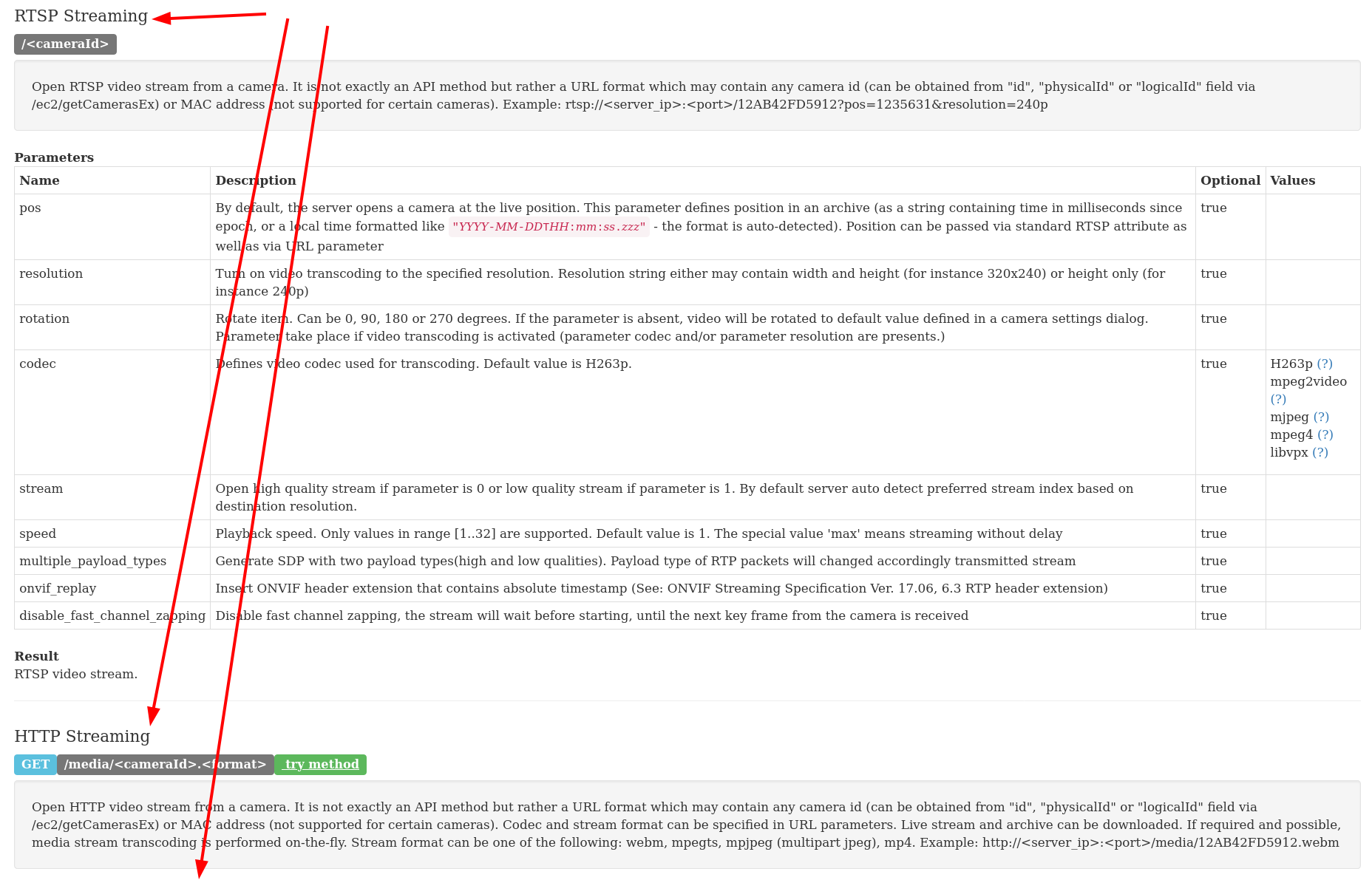
For details, see API documentation in Server's web interface
http://localhost:7001/static/api.xml#group_Video_API0 -
Hi Andrey
> to run as a plug-in within the Nx Witness framework software with our graphical user interface,
You could develop an analytics plugin with Metadata SDK. SDK provides possibilities for defining versatile settings visible in Nx Desktop Client. If those are not enough for your task, of course you could develop an external app with GUI which could communicate with your plugin over the network.
For plugin examples, see the "samples" folder of the SDK and this repo https://github.com/networkoptix/nx_open_integrations
- This is not exactly the working structure we want. We do not want to run our GUI application as an independant external application, we want it to be run in Nx Witness application. You can see it as an example in the image below.

> to share events with Nx Witness framework,
Your plugin could generate "Plugin diagnostics events" or "Plugin analytics events" thus notifying the Server and a user. These events can be configured for processing in the "Event rules..." dialog of the Desktop client.
It's up to the plugin to define the conditions when the plugin event should be triggered. For example, it might be a retrieval of a notification on the event in the external system.> We also have problems with "Event Rules".
- "Event Rules" can be added via SDK and Nx Witness application. However, the event rules cannot be deleted via the SDK. We could not see such a function.
- While creating "Event Rules", we have seen that we need to add separate "Event Rules" for devices that will receive audio notification, user notification and live video for an event. In our scenario, that means adding thousands of event rules. Because generally we use thousands of fire alarm devices in our projects. We just want to add a single "Event Rule" and use it constantly.
> to start streaming live images from ip cameras defined in Nx Witness through our graphical monitoring and management software.
You could use Server's video API for this. There are several possible methods.
For details, see API documentation in Server's web interface
http://localhost:7001/static/api.xml#group_Video_API- Is it possible for us to do this in the Nx Witness application? In other words, can we ensure that Nx Witness application can receive live images from the relevant camera by transmitting the camera information that we want to receive live images through the SDK?
0 -
>> we want it to be run in Nx Witness application.
Today this is achievable only if you implement web interface that can be opened using an embedded browser on the layout.
>> However, the event rules cannot be deleted via the SDK
We will follow up with the specific API method later.
>> We just want to add a single "Event Rule" and use it constantly.
We have plans to significantly improve the engine to be able to create much more flexible rules, but it will not be available in 2021, so for now it has to be multiple rules.
>> Is it possible for us to do this in the Nx Witness application? In other words, can we ensure that Nx Witness application can receive live images from the relevant camera by transmitting the camera information that we want to receive live images through the SDK?
Can you elaborate on that? What is user story and what is expected outcome from users perspective?If you want to receive live images through the SDK, then the plugin needs to be enabled on the camera. It is also possible to enable the plugin on some cameras by default (if the plugin reports as device-dependent), and there is also a way to enable the plugin for the camera via API.
0 -
Hello Ekrem,
> we want it to be run in Nx Witness application. You can see it as an example in the image below.
As Evgeny said, for now, the only way is to implement your interface as a web page and open that page in the Nx Desktop application as it was shown above. https://support.networkoptix.com/hc/en-us/community/posts/360051212274/comments/360014790973
Or you can use a web page with an embedded web-based remote desktop client application for connecting to your interface application on a remote server.> "Event Rules" can be added via SDK and Nx Witness application.
There is no possibility in SDKs of creating event rules.
Rules can be added via Nx Witness Server's API /ec2/saveEventRule
For details see API documentation in the Nx Witness Server' web interface.http://localhost:7001/static/index.html#/developers/api/ec2/saveEventRule
> However, the event rules cannot be deleted via the SDK. We could not see such a function.
A rule can be removed with the ec2/removeEventRule API. Here is the curl example.
vms_pass="your password"
vms_server="localhost"

api_method="ec2/removeEventRule"

rule_id_json='{
    "id": "{4cb05c1b-f5db-471c-a16b-90047c4ae9b4}"
}'

echo $rule_id_json | curl -k -X POST --digest https://admin:$vms_pass@$vms_server:7001/$api_method -H "Content-Type: application/json" -v --data-binary @-
0 -
> In our scenario, that means adding thousands of event rules. Because generally we use thousands of fire alarm devices in our projects. We just want to add a single "Event Rule" and use it constantly.
Currently, the only option is creating a rule per device. You can automate this task by a script utilizing the API functions manipulating rules:
- /ec2/getEventRules
- /ec2/saveEventRule
- /ec2/removeEventRule
0
Please sign in to leave a comment.
Comments
7 comments