Sample code: nxwitness-storage_sdk is not recognized.
Answered
Sample code: nxwitness-storage_sdk is not recognized.
Cross-platform--SDK: https: //nxvms.com/download/sdk downloaded "nxwitness-storage_sdk-4.1.0.31398-universal".
I ran build_samples.bat in the storage_sdk directory to build.
The build was done in the same way as nxwitness-metadata_sdk.
I placed the built ftp_storage_plugin.dll&test_storage_plugin.dll file in "C:\Program Files\Network Optix\Nx Witness\MediaServer\ plugins".
Then I restarted NxWitness, but the plugin is not recognized by NxWitness.
How can I make the plugin recognized?
Development environment
--Cmake version 3.19.0-rc1
--Windows10: Microsoft Visual Stadio 2019
--Meta VMS version = 4.1.0.31398. (Nxwitness-metadata_sdk-4.1.0.31398-universal.zip
-

Hello Kaho,
> Then I restarted NxWitness, but the plugin is not recognized by NxWitness.
What does it mean? What does "is not recognized" look like?
Set Server's logLevel setting to DEBUG in the mediaserver.conf file. Restart the Server.
Search Server's log_file.log for "PluginManager" messages. Do you see any related to "ftp_storage_plugin" and "test_storage_plugin"? Could you share your log_file.log file with Google disk or something similar, please?
0 -
Thank you for your reply.
"is not recognized" means that it does not appear in the Plugins tab of the camera settings (see attached image).
I think that "ftp_storage_plugin" and "test_storage_plugin" will displayed in the part where "sample_analytics_plugin" is displayed, is it correct?
In the log, "ftp_storage_plugin" and "test_storage_plugin" are output as "succeeded", but they are not displayed in the plugin tab like "sample_analytics_plugin".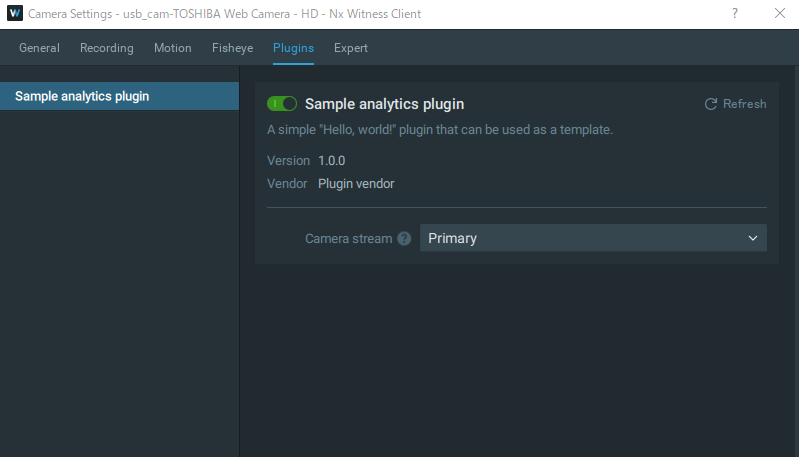
> Could you share your log_file.log file with Google disk or something similar, please?
We're sorry, but due to company regulations, we can't share Google discs.
Extract the logs related to "ftp_storage_plugin" and "test_storage_plugin" of "Plugin Manager" from "log_file.log" and send them.・ftp_storage_plugin
2020-10-29 10:40:40.619 156c INFO PluginManager(0x1bed1e07d30): Considering to load Server plugin [C:/Program Files/Network Optix/Nx Witness/MediaServer/plugins/ftp_storage_plugin.dll]
2020-10-29 10:40:40.619 156c DEBUG PluginManager(0x1bed1e07d30): (before loading plugin ftp_storage_plugin) GetDllDirectoryW(0, nullptr) -> 1
2020-10-29 10:40:40.619 156c DEBUG PluginManager(0x1bed1e07d30): (before loading plugin ftp_storage_plugin) GetDllDirectoryW(1, result) -> 0 ""
2020-10-29 10:40:40.619 156c DEBUG PluginManager(0x1bed1e07d30): (before loading plugin ftp_storage_plugin) SetDllDirectoryW("") succeeded
2020-10-29 10:40:40.657 156c INFO PluginManager(0x1bed1e07d30): Loaded Server plugin [C:/Program Files/Network Optix/Nx Witness/MediaServer/plugins/ftp_storage_plugin.dll] (old SDK, main interface nxpl_PluginInterface, sdk version "")
2020-10-29 10:40:40.657 156c DEBUG PluginManager(0x1bed1e07d30): (after loading plugin ftp_storage_plugin) SetDllDirectoryW(null) succeeded・test_storage_plugin
2020-10-29 10:40:40.976 156c INFO PluginManager(0x1bed1e07d30): Considering to load Server plugin [C:/Program Files/Network Optix/Nx Witness/MediaServer/plugins/test_storage_plugin.dll]
2020-10-29 10:40:40.976 156c DEBUG PluginManager(0x1bed1e07d30): (before loading plugin test_storage_plugin) GetDllDirectoryW(0, nullptr) -> 1
2020-10-29 10:40:40.976 156c DEBUG PluginManager(0x1bed1e07d30): (before loading plugin test_storage_plugin) GetDllDirectoryW(1, result) -> 0 ""
2020-10-29 10:40:40.976 156c DEBUG PluginManager(0x1bed1e07d30): (before loading plugin test_storage_plugin) SetDllDirectoryW("") succeeded
2020-10-29 10:40:40.994 156c INFO PluginManager(0x1bed1e07d30): Loaded Server plugin [C:/Program Files/Network Optix/Nx Witness/MediaServer/plugins/test_storage_plugin.dll] (old SDK, main interface nxpl_PluginInterface, sdk version "")
2020-10-29 10:40:40.994 156c DEBUG PluginManager(0x1bed1e07d30): (after loading plugin test_storage_plugin) SetDllDirectoryW(null) succeeded(Please refer to it if necessary.)
・sample_analytics_plugin
2020-10-29 10:40:40.938 156c INFO PluginManager(0x1bed1e07d30): Considering to load Server plugin [C:/Program Files/Network Optix/Nx Witness/MediaServer/plugins/sample_analytics_plugin.dll]
2020-10-29 10:40:40.938 156c DEBUG PluginManager(0x1bed1e07d30): (before loading plugin sample_analytics_plugin) GetDllDirectoryW(0, nullptr) -> 1
2020-10-29 10:40:40.938 156c DEBUG PluginManager(0x1bed1e07d30): (before loading plugin sample_analytics_plugin) GetDllDirectoryW(1, result) -> 0 ""
2020-10-29 10:40:40.938 156c DEBUG PluginManager(0x1bed1e07d30): (before loading plugin sample_analytics_plugin) SetDllDirectoryW("") succeeded
2020-10-29 10:40:40.976 156c INFO PluginManager(0x1bed1e07d30): Loaded Server plugin [C:/Program Files/Network Optix/Nx Witness/MediaServer/plugins/sample_analytics_plugin.dll] (main interface nx_sdk_analytics_IPlugin, sdk version "4.1.0 R9")
2020-10-29 10:40:40.976 156c DEBUG PluginManager(0x1bed1e07d30): (after loading plugin sample_analytics_plugin) SetDllDirectoryW(null) succeeded0 -
Hello Kaho,
Thanks for the detailed response.
> I think that "ftp_storage_plugin" and "test_storage_plugin" will displayed in the part where "sample_analytics_plugin" is displayed, is it correct?
No, it's not. Only analytics plugin are shown in the Plugins tab of the camera settings, since analytics plugins are designated specifically for cameras.
You can see all loaded plugins (including storage and video source plugins) via the /api/pluginInfo API function.0 -
Hello, Andrey.
Thank you for answering.
"ftp_storage_plugin" and "test_storage_plugin" did not appear in System Administration in the main menu. Is this correct? (See attached image)
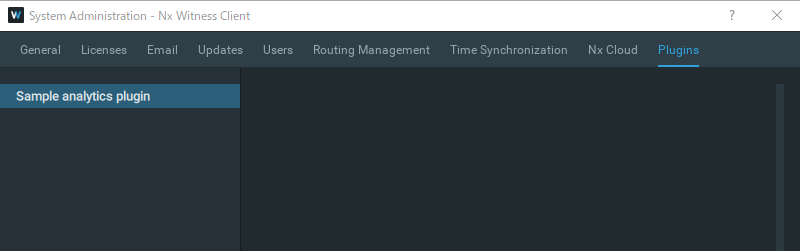
Also, is there a way to check "ftp_storage_plugin" and "test_storage_plugin" other than log output?
For example, on the NxWitnessClient screen.0 -
Hi,
> "ftp_storage_plugin" and "test_storage_plugin" did not appear in System Administration in the main menu. Is this correct?
Yes, that's correct.
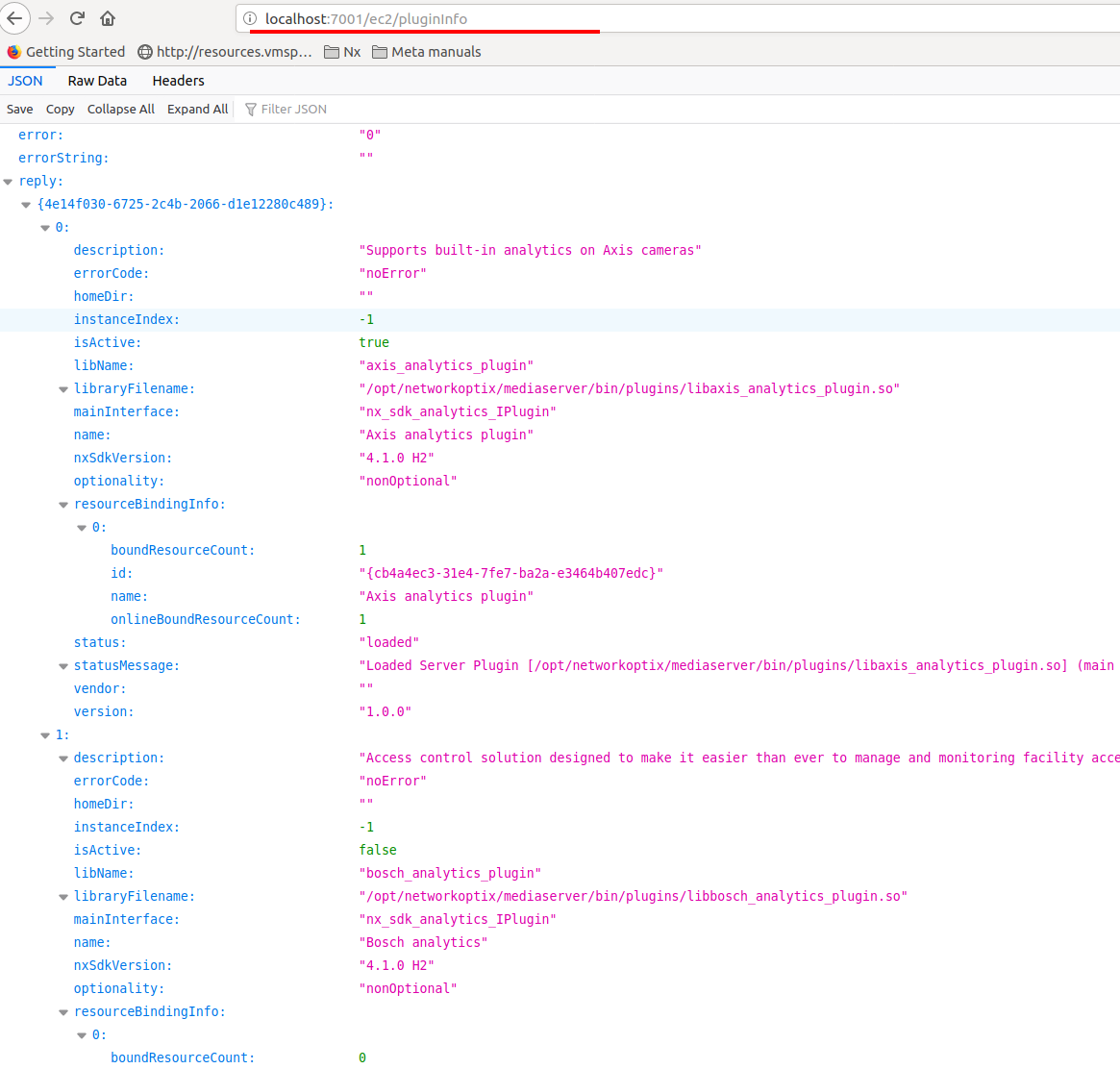
> is there a way to check "ftp_storage_plugin" and "test_storage_plugin" other than log output?Yes, there is. Invoke the ec2/pluginInfo Server's Web API function.
http://localhost:7001/ec2/pluginInfo
Here is its output
 0
0 -
Hello, Andrey.
thank you for your answer.The problem is solved!
0
Please sign in to leave a comment.
Comments
6 comments