Tree on Plug-in setting menu.
Answered
How can I implement tree on plugin setting menu, like following image.
What syntax should I use for a device agent's manifest.
Do you have any examples.
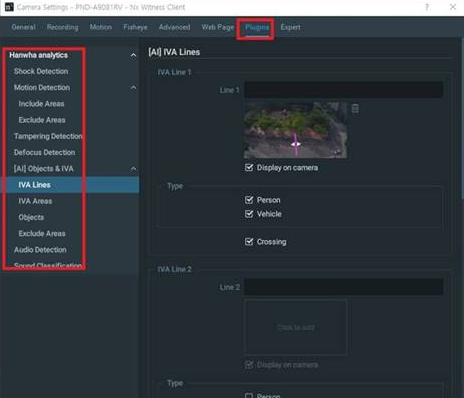
-

Hi Jason,
Sure thing you can. To have an example, please refer to Stub analytics plugin manifest that you can find here:
metadata_sdk/samples/stub_analytics_plugin/src/nx/vms_server_plugins/analytics/stub/engine.cpp
Refer to "deviceAgentSettingsModel" which is a part of engine manifest.
What you are looking for is a thing called "sections", e.g.:
"sections": [
{
"type": "Section",
"caption": "Example",
"items": [
.....]
"sections": [
{
"type": "Section",
"caption": "Nested section",
"items": [.......
]
},
......
]
It will add a section with a caption "Example" in your Plugin settings and a section with a caption "Nested section" that is nested inside "Example" section.
Basically, that's it: this way you can develop a tree-like structure in you Plugin settings.
0
Please sign in to leave a comment.
Comments
1 comment