Add a back button on full screen camera view
Answered
I have noticed a lot of customers click the X button on a full screen camera to get back to the grid view and then wonder why the camera they were just looking at is no longer in the grid.
I was wondering if you could change the control buttons on a full screen camera view to look like this..
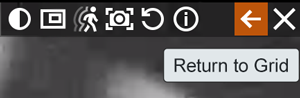
Add a return to grid button and put a space between that and the buttons for interacting with the video.
1
-

Jeff, thanks.
We also had some customers who experienced the same problem. We'll get it fixed in the 4.2 version.
0 -

I had this issue when I first started deploying NX. I quickly learnt to lock the layouts. That stopped the cameras from being removed from the layouts.
0
Please sign in to leave a comment.
Comments
2 comments