"Storage for analytics data in not set" notification
Completed
Hi.
We are a partner of network optix, and while testing the product, a question arose.
The operating environment is:
Version: 5.1.4.38659
OS: Windows 11 Pro
Using 2 PCs. The client and server programs are installed on PC 1, and the server program is installed on PC 2.
"Storage for analytics data in not set" notification
I tried several tests but couldn't see the notification.
What are the conditions under which the above notification occurs?
I would appreciate it if you could share a test method to confirm this notification.
thank you
-

Thank you for your post and question.
Upon review, it doesn't appear that we have a notification called "Storage for analytics data is not set" which is why you are not seeing the notification show.
You can find a screenshot that lists all available notifications within our documentation (linked for your convenience).
Please let us know if this helped answer your question and if not, then please let us know further details so that we can better assist, thank you.
0 -
Hi Michael Palmer.
Thanks for your reply.
The manual says exactly what you say, but in reality the program displays a list like the picture below.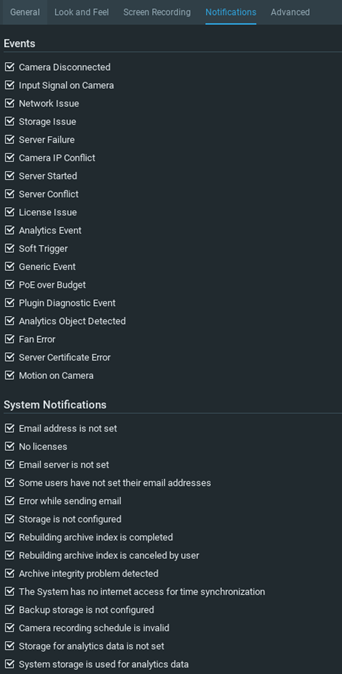 0
0 -
Thank you for the quick reply.
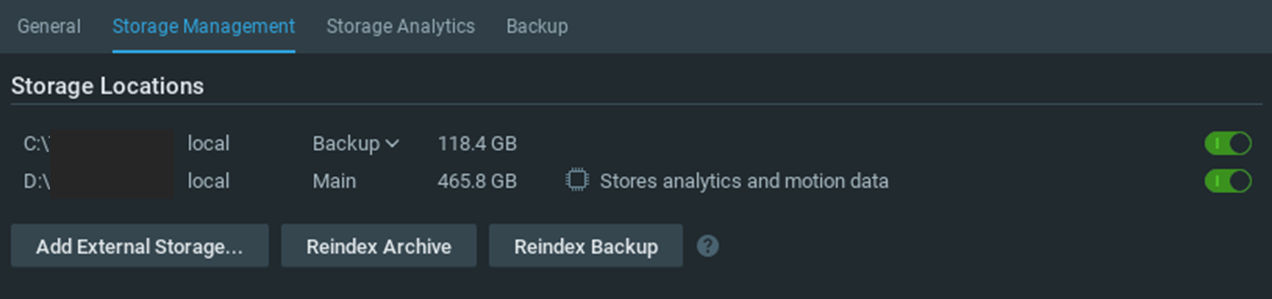
I apologize for the confusion, the screenshot you provided includes the answer for why the notification is not listed.
With your setup, the D:\ is currently setup to "store analytics and motion data", so it is configured (the note that you see is telling you that it "stores" that data) which would explain why you are not seeing the notification.
When the notification appears, you should expect to see a message in your storage management similar to the following screenshot:

This may not be showing up for you as you have 2 drives setup, one being the system/OS drive, which Nx recommends not using for storing analytics data. One way to test and see if you can get this message may be to add a 3rd drive and identify if you get the option to "Use to store analytics and motion data" as shown in the above screenshot.
Please let us know if this helps answer your questions around this notification. Thank you.
0
Post is closed for comments.
Comments
3 comments