Users; Force shared layout, unpinned panels, disable creation new layouts
Answered
I've defined a shared locked layout for our users (operators).
But they are defining their own layouts too, and are using them.
Is it possible to disable the option for users to create their own layouts.
Also I want to have the locked shared layout to be launched on startup.
Also I want them to have the panels unpinned, so the view is maximized.
I've specified custom roles.
Thanks in advance for the help.
-
Hello @...,
1. Is it possible to disable the option for users to create their own layouts.
No, it cannot be done in Nx by design.
2. Also I want to have the locked shared layout to be launched on startup.
There are two ways:
1. By default, the client remembers its last state in the cator was closed, that is, if you close the client with an open layout, and then start the client, it will remember the state.
2. You can Do something similar, like programatically open a specific layout on a prticular server:
Please refer to THIS article, which describes what parameters for starting the client can be configured.
In your case, you need the parameters from the Open to a Specific Layout example:
--auth = http: // admin: 1234@192.168.1.200: 7001 - this line connects you to the target server.
--layout-name = "Some layout name" - Name of layout which will be opened after connection to server.In order not to do this every time, use the following programs:
Windows: Task scheduler
Linux: cronjob, cron
Mac OS: automator
You will have to do this on each computer of your users (operators).3. Also I want them to have the panels unpinned, so the view is maximized.
By default, the client remembers its last state when it was closed, that is, if you hide all the panels yourself, or press f11, and then close and open the client, it will remember the state. This is a client-specific state, it is not stored for the server.
You will have to do this on each computer of your users (operators).0 -
Hi Roman,
So when you want to autologin to 2 different servers.. you can use the --auth .. but then you have the password in clear text in the command.. is there another way ?
Thanks for the help.
Dieter H.
0 -
Hello @...,
In this case, leave only one launch option with a specific layout.
Something like this: "HD Witness.exe" --layout-name = "Some layout name"Then, to connect to the target server, you can use the client's auto-login option.
To enable it, follow the instructions below:
1. Start the client, and connect to your system.
2. Open the menu tab and select the Connect to Another server option.
3. Enter the IP address of the target server in the Host field, then enter your credentials and enable the auto-login option as shown in the screenshot.
Of course, this will have to be done on each computer of your operators.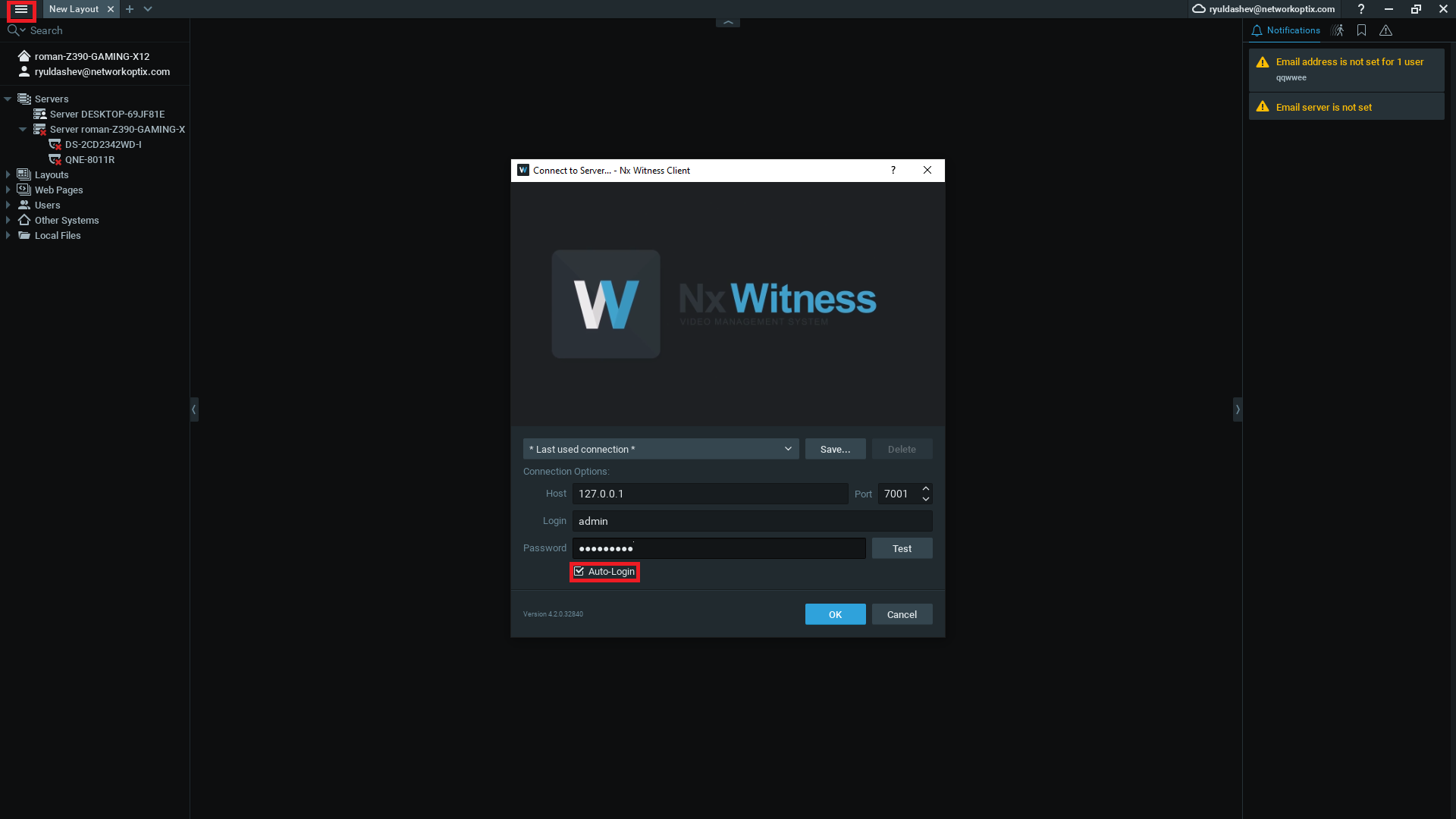
Finally, launch the client via CLI with the "--layout-name" parameter.
0 -
Hi Roman,
Yes but I want to have the autologin to 2 seperate servers.. starting from 2 desktop shortcuts.
I tried this, but when clicking on the desktop shortcut it opens automatically to the last logged in server.0 -
Hi,
In this case, you can try the following method:
Example:
"HD Witness.exe" --no-single-application nx-vms://nxvms.com/client/localhost:7001/view?resources=cf13622d-b16d-420a-91aa-4dff7aab23fb^&auth=YWRtaW46MTIzUVdFYXNk
Each server has its own startup line, of course.
Where:
1. --no-single-application - The parameter allows to open several clients at the same time.
2. nx-vms://nxvms.com/client/localhost:7001/view - This line contains the path to the target server, only the server address changes here.
3. resources = {id} - This parameter allows you to open a specific resource when starting the client, in your case you need the ID of a specific layout. It can be found using an API request:Sample API request: https://localhost:7001/ec2/getLayouts
NOTE: Before opening the above URL, install the JSON Formatter extension in your browser.On the resulting page, you need to find the NAME of your specific layout. Then move from it up to the heading called "items". There will be an arrow to the left of "items", click on it. This will help remove a lot of unnecessary lines, and then your page should look something like mine in the screenshot. Finally, you need to copy the layout ID, in the screenshot I circled the name of my layout and its ID.
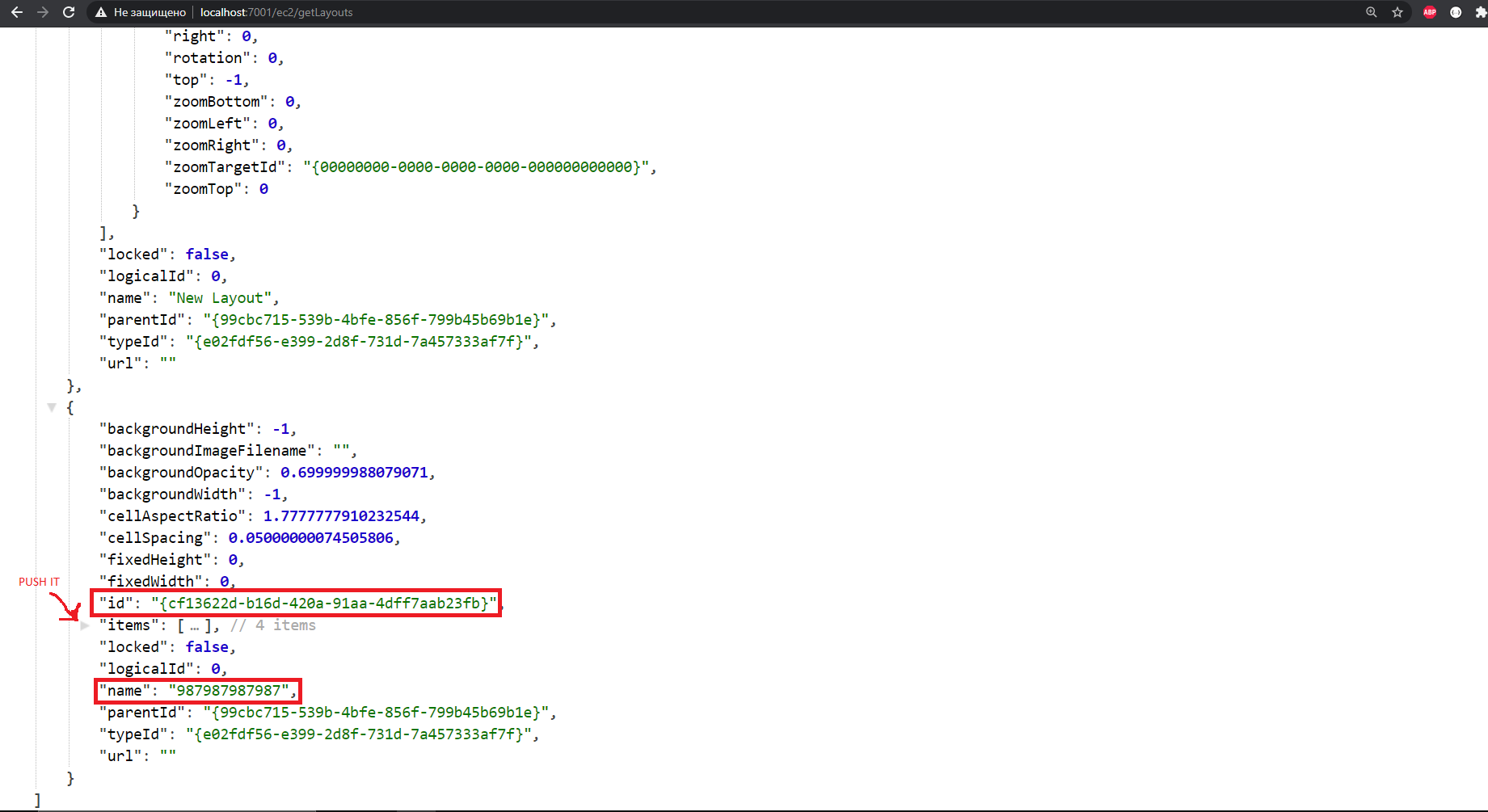
4. auth = {auth_digest} - This line with your credentials, which I encrypted using the encryptor in THIS article. The encryption method here is very simple, but it still hides the login and password from prying eyes, it is called base64. Applies to the string username:password.
0 -
Hi Roman,
This seem to work, pitty there is no encryption possible.. eg with a key you can use..
One thing I want to underline is the ^ before &auth."HD Witness.exe" --no-single-application nx-vms://nxvms.com/client/localhost:7001/view?resources=cf13622d-b16d-420a-91aa-4dff7aab23fb^&auth=YWRtaW46MTIzUVdFYXNk
0
Please sign in to leave a comment.
Comments
6 comments