Api to get camera backup settings
Answered
Hi Everybody,
I need to get the list of backup settings with a API command.(which is shown on the
picture below) I have already searched the API library. There are two API commands related to the back up settings, these are get/set backUpSettings and get/set backupPositions. It seems they are not listing the camera back up information like below in the picture(whatToBackUp, BackUpQuality)
I need a API command to get and set these back up features for the cameras. Could you help me about it.
Thanks,

-

Hello Ali Ergin Hacimahmutoglu,
We see your requests. There is no need to create duplicate threads on the same topics. Please avoid doing that. Instead, try to explain your situation in a post in the thread.
Could you please provide the following information: OS version, VMS build number?
0 -
Hi Andrey,
Here are the versions I use,

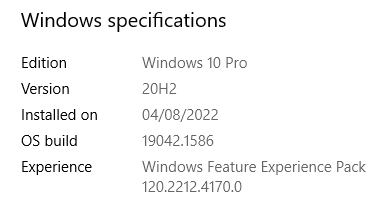
Thanks,
0 -
Thanks.
The information "What to backup" and "Quality" is stored in the device options.
Use /rest/v1/devices/{id} API to get it.
Here is an example
"options": {
    "backupContentType": "bookmarks",
    "backupPolicy": "on",
    "backupQuality": "CameraBackupLowQuality",
    "dewarpingParams": "{\"cameraProjection\":\"equidistant\",\"enabled\":false,\"fovRot\":0,\"hStretch\":1,\"radius\":0.5,\"sphereAlpha\":0,\"sphereBeta\":0,\"viewMode\":\"ceiling\",\"xCenter\":0.5,\"yCenter\":0.5}",
    "preferredServerId": "{a55e39cb-4c8b-b176-a144-87f853374086}"
  }
0 -
Thanks for your help, I guess, it is also possible to set a backupQuality and whatToBackUp feature of camera with the modify device record API command.
Thanks in advance
0 -
Yes, of course. You can modify options by inoking PATCH /rest/v1/devices/{id} and passing the appropriate options.
For example,
 0
0 -
Thanks Andrey great help. I will use these two api commands in my project.
0
Please sign in to leave a comment.
Comments
6 comments